Appearance
Exporting Results
Export completed scans as a shareable PDF report or a machine‑readable JSON file.
Export as PDF
To export findings as a PDF:
- Click on the specified completed scan.
- In the overview tab section, click the three dots icon … in the upper right.
- Select
Export as PDF
The report will be downloaded to your local folder:
- Filename format:
[title-of-report--report-year-month-day] - Example:
uniswap-v4-core--report-2025-03-26
PDF report contents
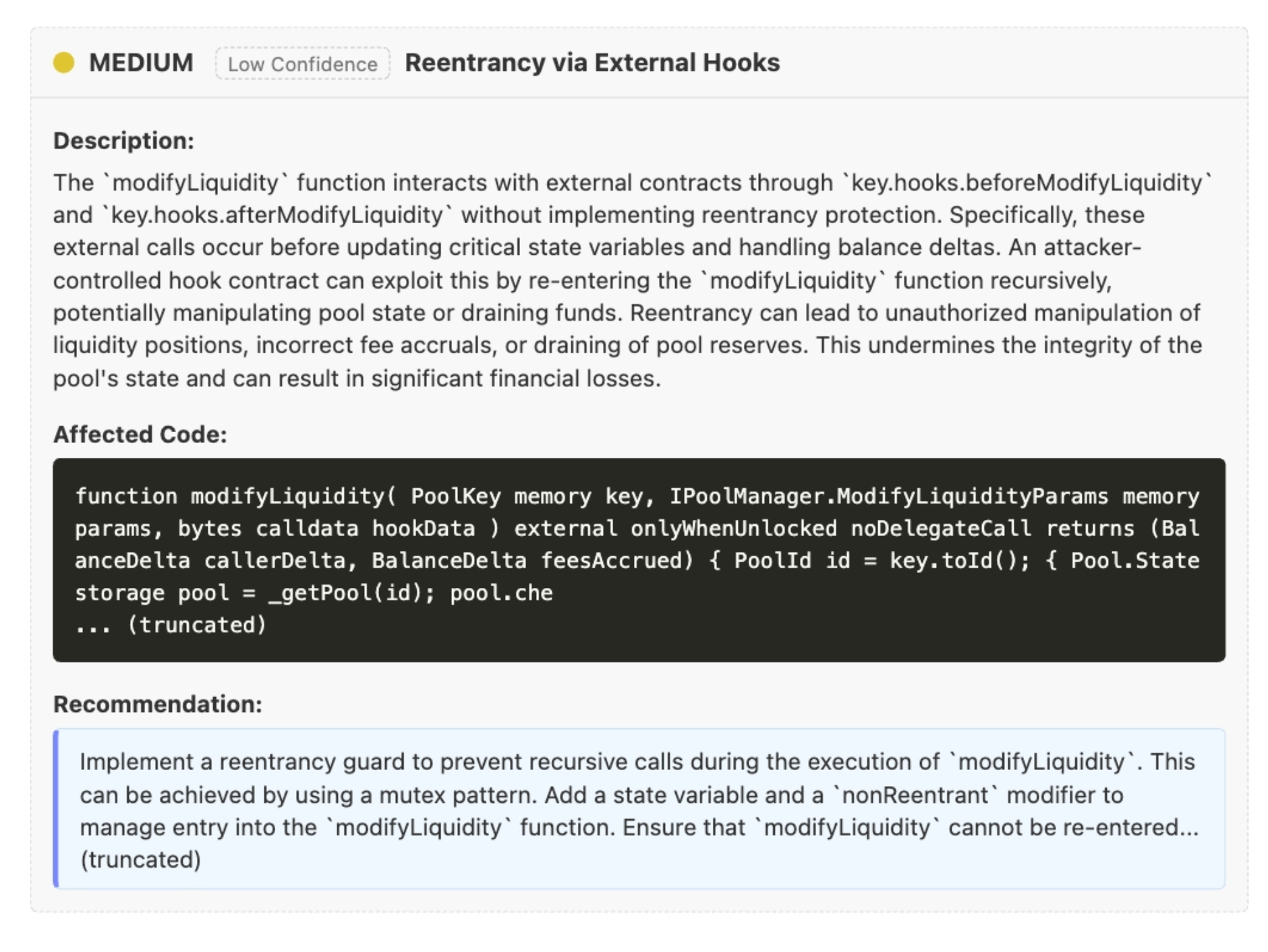
The PDF report includes all findings (including dismissals). Here's an example PDF output showing how findings are formatted in the report, including severity levels, file location, and detailed description:
Export as JSON
To export findings as JSON:
- Open a completed scan.
- Click the three dots icon … in the upper right.
- Select
Export as JSON.
TIP
Exporting is a paid feature. If Export as PDF/JSON is disabled in the menu, your plan may not include exports.
The JSON report is downloaded locally with a filename like:
- Format:
<scan-name>-findings-YYYY-MM-DD.json - Example:
my-project-main-findings-2026-01-01.json
WARNING
The exported JSON contains internal IDs (UUIDs), repository paths, and finding details. Redact sensitive information before sharing it externally.
JSON format (example)
This is an example export (sanitized; IDs and repo names replaced with placeholders, and long fields truncated):
json
{
  "metadata": {
    "scan_id": "<scan_uuid>",
    "scan_name": "<repo_owner>/<repo_name>@<git_sha>",
    "scan_date": "2026-01-01T12:04:00Z",
    "export_date": "2026-01-01T23:35:42.465Z"
  },
  "summary": {
    "total_findings": 2,
    "findings_by_severity": {
      "critical": 0,
      "high": 1,
      "medium": 1,
      "low": 0
    },
    "total_files": 6,
    "files_with_findings": 2
  },
  "findings": [
    {
      "id": "<finding_uuid>",
      "file_id": "<file_uuid>",
      "project_id": "<project_uuid>",
      "scan_id": "<scan_uuid>",
      "severity": "MEDIUM",
      "created_at": "2026-01-01T12:05:12Z",
      "title": "Stored XSS via unescaped feedback rendering",
      "category": "Cross-Site Scripting (XSS)",
      "description": "…",
      "recommendation": "…",
      "impacted_code": "…",
      "rating": "NONE",
      "state": "OPEN",
      "details": {
        "agent": {
          "name": "OTHER"
        },
        "sources": [
          {
            "type": "FILE",
            "name": "src/feedback_portal.php",
            "start_line": 1,
            "end_line": 200
          }
        ]
      },
      "location": {
        "start_location": { "line": 15 },
        "end_location": { "line": 25 }
      }
    },
    {
      "id": "<finding_uuid>",
      "file_id": "<file_uuid>",
      "project_id": "<project_uuid>",
      "scan_id": "<scan_uuid>",
      "severity": "HIGH",
      "created_at": "2026-01-01T12:05:18Z",
      "title": "Integer overflow enables undersized allocation and OOB reads",
      "category": "Resource Management",
      "description": "…",
      "recommendation": "…",
      "impacted_code": "…",
      "rating": "NONE",
      "state": "OPEN",
      "details": {
        "agent": {
          "name": "OTHER"
        },
        "sources": [
          {
            "type": "FILE",
            "name": "src/netmsg_processor.c",
            "start_line": 1,
            "end_line": 200
          }
        ]
      },
      "location": {
        "start_location": { "line": 17 },
        "end_location": { "line": 49 }
      }
    }
  ],
  "files": [
    {
      "id": "<file_uuid>",
      "name": "feedback_portal.php",
      "path": "src",
      "status": "COMPLETE",
      "findings_count": 1
    },
    {
      "id": "<file_uuid>",
      "name": "netmsg_processor.c",
      "path": "src",
      "status": "COMPLETE",
      "findings_count": 1
    }
  ]
}
Notes:
- The export includes the scan’s
findingsarray as-is (including the findingstate). summary.findings_by_severitycurrently includes counts forcritical,high,medium, andlow.