Appearance
Scan Configuration
Almanax offers two ways to select which files to scan:
- Scan Preview - A visual file tree with checkboxes via project creation or project settings.
- YAML Configuration - Code-level control using glob patterns in project settings.
Scan Preview (tree selector)
After project creation go to: Project Page › ⚙️ Settings › Scan Configuration
When creating a new project or starting a new scan, you'll first see a scan preview interface that displays a file tree of your repository:
- Select or deselect entire directories by checking the folder checkboxes
- Expand directories (using the ▶ triangle) to select specific files
- See the total number of files that will be scanned
The tree mirrors your repository’s folder structure so you can navigate just like in GitHub.
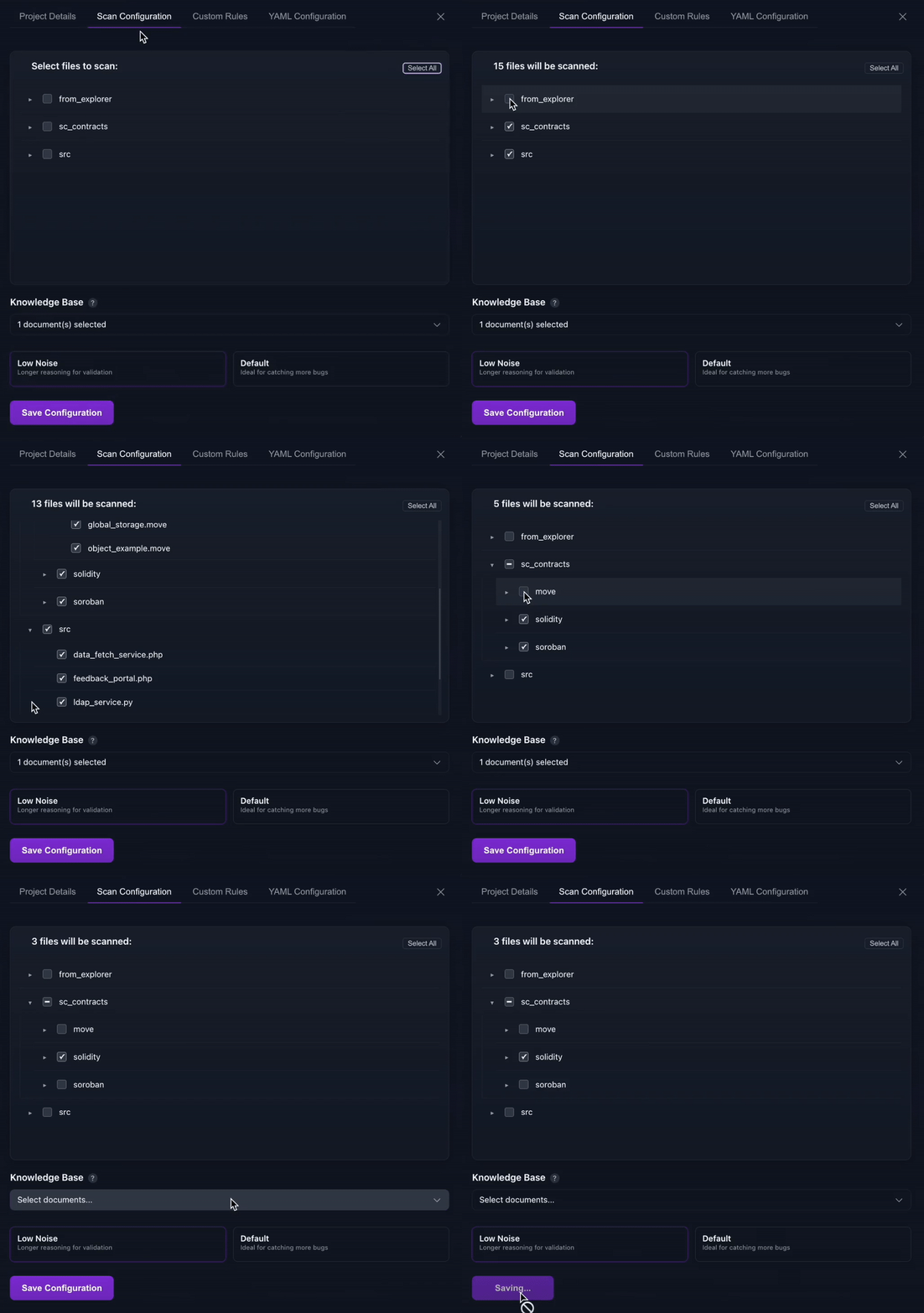
- Select folders or expand to pick individual files.
- Counter at the top shows exactly how many files will be scanned.
- Use Select All / Deselect All for quick toggles.
- Select Knowledge Base docs to include → Knowledge Base
- Pick a Scan Mode (Low-Noise or Default) → Scan Mode steps
Why are some files hidden?
Almanax pre-filters the tree with sensible defaults:
• Includes*and**/*(everything) but excludes common noise like**/test/**,**/tests/**,**/node_modules/**.
• Language-specific extras are also skipped (e.g.*.test.sol,*.t.sol,*_test.move,*.test.rs).
You can still add any of these paths back via YAML if you need them.
> NOTE Almanax skips non-code files (README.md, images, PDFs, binaries) during scanning since they don’t contain executable logic. See the full Supported File Types table.
YAML Configuration
Accessing the YAML file: Project Page › ⚙️ Settings › Edit Configuration
Project scans can be configured with glob-style patterns to precisely define which files should be included or excluded from the scan.
In addition, you can:
- Attach Knowledge Base docs → Knowledge Base
- Set CI/CD thresholds & triggers → CI/CD Configuration
- Note: Rules are configured separately → Rules
Wildcards and Patterns
*matches any sequence of characters within a single directory- Example:
src/*.solmatches all Solidity files directly undersrc/
- Example:
**matches files recursively in subdirectories- Example:
contracts/**/*.solmatches Solidity files in any folder undercontracts/
- Example:
Include/Exclude Structure
The configuration is split into two parts:
- Include: Specifies the files or directories that will be scanned
- Exclude: Specifies patterns to skip, even if they match an include pattern
Configuration Examples
Example 1: Basic Include
- (Default scan mode, no rules, no CICD integration, and no design docs)
include:
  - src/*.sol                   # Includes all Solidity files directly under the src directory
exclude: []                     # No files are excluded from the scan
scan_mode: DEFAULT              # Default scan mode selected, could also be LOW_NOISE
github: {}                      # Shows no CICD integration
documents: []                   # Shows no knowledge base documentation
Example 2: Include with Exclude
- (LOW_NOISE mode; no CI/CD integration shown.)
include:
  - src/**/*.rs                   # Includes all Rust files in the source directory and subdirectories
exclude:
  - src/bin/**                    # Excludes all files within the contracts/test directory
scan_mode: LOW_NOISE              # LOW_NOISE mode is selected
github: {}                        # No CI/CD integration in this example
documents: []                     # No knowledge base docs in this example
Example 3: Complex Configuration (Using Uniswap V4)
- (LOW_NOISE mode + Docs + CI/CD. Rules configured separately.)
include:
  - src/ERC6909.sol
  - src/ERC6909Claims.sol
  - src/Extsload.sol
  - src/Exttload.sol
  - src/NoDelegateCall.sol
  - src/PoolManager.sol
  - src/ProtocolFees.sol
exclude:
  - src/interfaces/**
  - src/libraries/**
  - src/types/**
  - "**/test/**"
  - "**/tests/**"
  - "**/node_modules/**"
  - "**/*.test.sol"
  - "**/*.t.sol"
scan_mode: LOW_NOISE
documents:                    # Knowledge-base docs included
  - Uniswap-Whitepaper-v4.pdf
github:                       # CI/CD gate enabled (fail ≥MEDIUM)
  severity: MEDIUM
  count: 1
  trigger: EVERY_COMMIT
  comments_enabled: false
Previewing Configuration
After setting the patterns, click Preview matched files to verify the glob patterns correctly target the intended files and view the files which will be scanned.
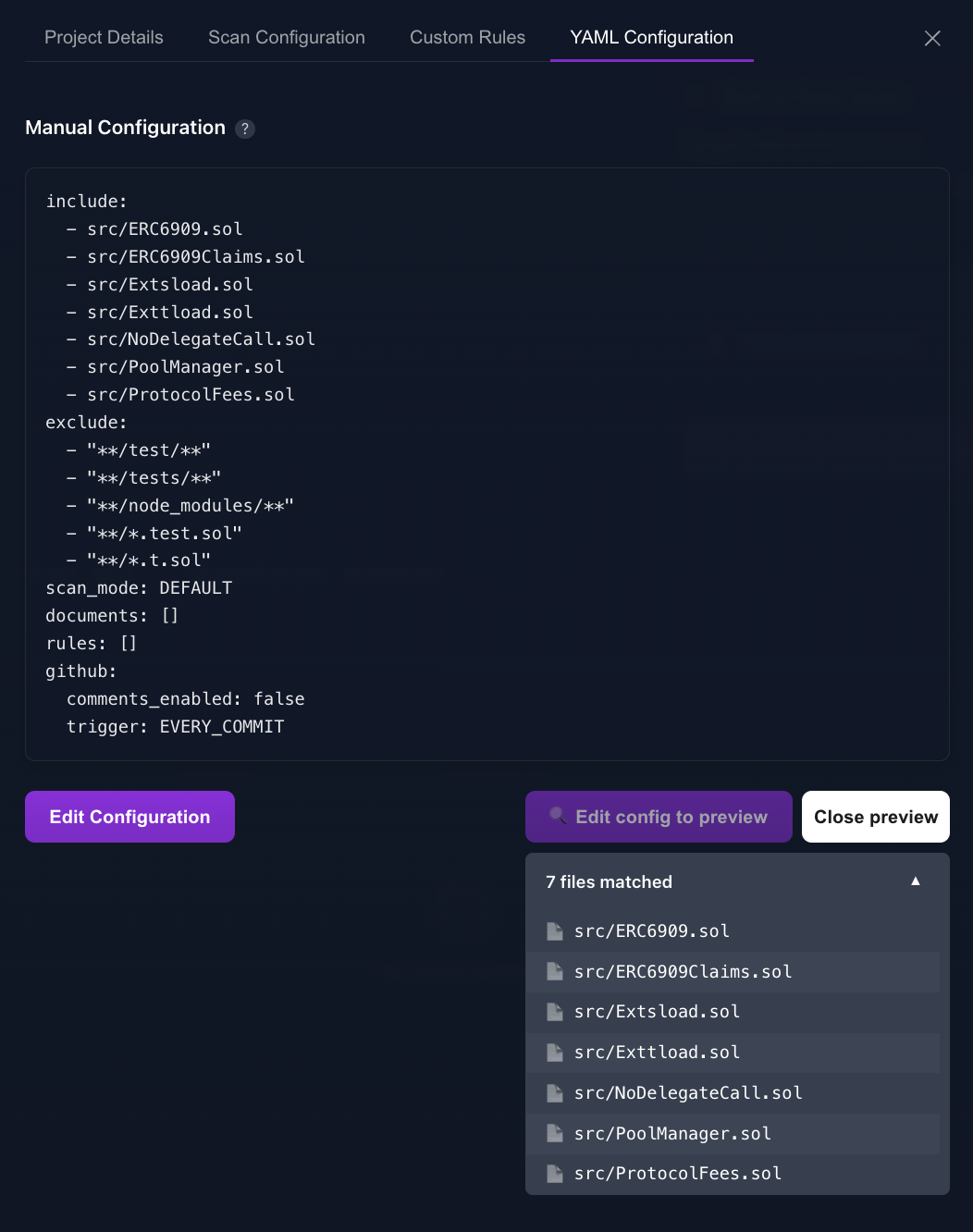
Once the scan configuration matches the desired files, you're ready to scan.
Target Reference Options
You can specify which version of your code to scan: branch, tag, or SHA
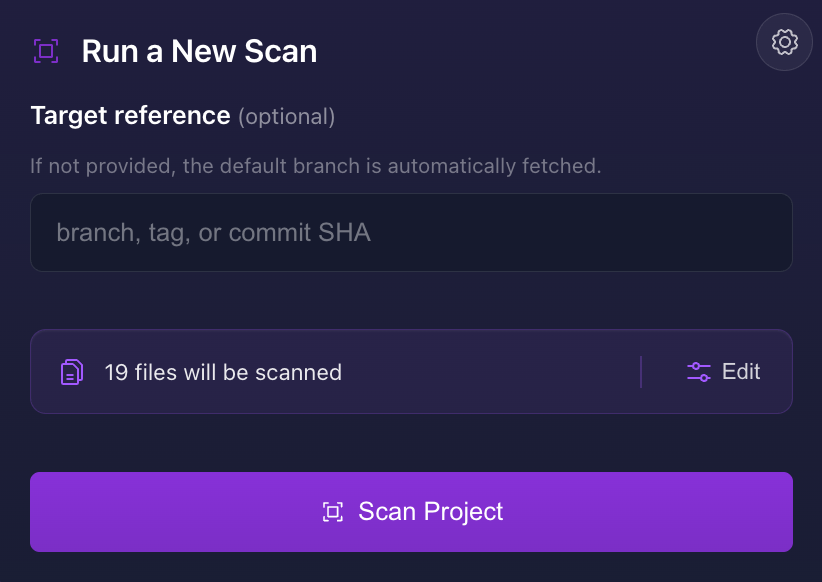
Examples:
- Branch names:
main,master,develop - Tags:
v1.0.0,release-2024-03 - Commit SHA (placeholder examples):
- Full SHA:
4a2b1c3d4e5f6789abcdef0123456789abcdef01 - Short SHA:
4a2b1c3(first 7 characters)
- Full SHA:
Reference Behavior
The scan will analyze different code versions based on your selection:
- Branches: Scans the latest commit on the specified branch
- Tags: Scans the exact tagged version
- Commit SHAs: Scans the specific commit
- No Selection: Uses the default branch "main"
TIP
When selecting a branch, verify you're using the correct name as some repositories use "master" while others use "main".
CI/CD Configuration
If you use the GitHub CI/CD integration you can set thresholds directly in the same YAML file.
trigger is a single-choice switch
• EVERY_COMMIT (default) – scan every push to the PR branch
• COMMENT_ONLY – scan only when someone comments @almanax run Pick one value; listing both doesn’t make sense (the last one wins if you try).
Example 1 – Block PR on ≥1 MEDIUM finding (scans every commit)
github:
  severity: MEDIUM        # fail if ≥this severity
  count: 1                # and at least this many findings
  trigger: EVERY_COMMIT   # scan every push
Example 2 – On-demand scans, non-blocking (comment trigger)
github:
  trigger: COMMENT_ONLY       # runs when someone comments @almanax run
  comments_enabled: true      # optional inline review comments
Threshold behavior
- Omitting
severitydisables blocking; the status check always passes (results are informational). - Omitting
countblocks the PR on the first finding at the chosen severity (or higher). counthas no hard maximum; any positive integer is valid. Use a large number—or omit it—to allow effectively unlimited findings.
TIP
These examples include only the github: subsection.
Make sure you keep the rest of your YAML (include/exclude, scan_mode, documents) intact.
See full details in the CI/CD guide.
Rules Configuration
You can embed project-specific rules right inside the YAML under rules:—or manage them visually in Project Settings › Rules › Click Add Rule. Each entry follows the same fields as the Add Rule form.
Example 1: (Using one rule)
yaml
rules:
  - slug: price-bound-check
    prompt: Require price ≤ max_price
    exts:
      - .sol
    severity: MEDIUM
Example 2: (Using two rules)
yaml
rules:
  - slug: price-bound-check
    prompt: Require price ≤ max_price
    exts:
      - .sol
    severity: MEDIUM
  - slug: zero-address-check
    prompt: Flag any transfer/mint/burn function that sends tokens or sets an owner
      **without** requiring `to != address(0)` (or analogous zero-address
      check), which can irreversibly lock funds or break invariants.
    exts:
      - .sol
    severity: HIGH
TIP
These examples include only the rules: subsection.
Make sure you keep the rest of your YAML (include/exclude, scan_mode, github, documents) intact.
See the Rules docs for format guidance.
File Type Support
Almanax supports scanning a wide variety of programming languages and file types. For a comprehensive list of all supported file extensions, please see the Supported File Types page.
WARNING
Almanax can handle repositories of any size, but individual files ≥ 200 KB are skipped during indexing/scanning. For PR review scans, very large diffs may be rejected (diff context limit is ~500K characters).