Appearance
Switching Organizations
This guide explains how to switch between different organizations in Almanax.
Organization Context
When you're on a paid plan and belong to multiple organizations, you'll need to switch between them to access different projects and settings.
How to Switch Organizations
- Click on the organization selector in the sidebar
- A dropdown menu will appear showing all organizations you belong to
- Select the organization you want to activate
- The interface will update to show content for the selected organization
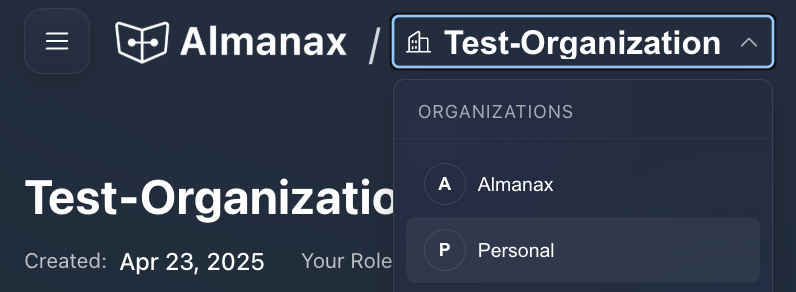
What Changes When You Switch
The active organization you have selected determines:
- Which projects you can see and access
- Which gated features you can use (based on the organization's subscription tier)
- How many resources (scans, projects) you can consume
- Which team members can see your projects and findings
Personal vs. Team Organizations
Personal Organization
- Every user has a personal organization by default
- This is your private workspace
- Only you can see projects in your personal organization
- It's assigned to a FREE subscription plan unless upgraded
Team Organizations
- Created by users on paid plans
- Multiple members can collaborate
- Shared visibility of projects and findings
- Access is determined by your assigned role
Best Practices for Multiple Organizations
If you belong to multiple organizations, consider these tips:
- Pay attention to which organization is currently active
- Verify the active organization before creating new projects
- Check the subscription tier when running scans to ensure you have necessary features
- Switch to your personal organization for private projects
Enterprise Shared Organization
For enterprise users working in a team:
- A shared organization provides visibility across the team
- All team members can see projects and scan results
- Particularly useful for monorepo projects with CI/CD enabled
- Allows everyone to see PR scan results